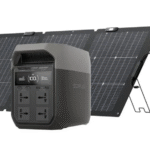
Matching devices with a portable power station safely starts with one question: how much power does each device actually need? If you skip that step, you can overload the unit, trip protection systems, or fail to run essential equipment when you need it most. A safe match depends on continuous wattage, startup surge, outlet type, and how many devices will run at the same time. It also helps to leave extra capacity instead of pushing the power station to its limit. By checking these basics before plugging in, you can power electronics, tools, and appliances more reliably and avoid preventable damage or interruptions.

Check Device Power Requirements Before Connecting
How to Find Wattage on Labels or Manuals
Start by checking the device nameplate, power adapter, manual, or manufacturer documentation for wattage information. Many appliances list power as watts directly, such as 60W, 300W, or 1500W. If the label shows rated power and starting power separately, note both values because motors, compressors, and pumps often need a higher surge at startup. Also confirm whether the device uses AC, DC, USB-A, or USB-C, since the correct port matters as much as wattage. For example, a portable power station such as the EcoFlow DELTA 3 Plus provides 1800W AC output, or 2400W with X-Boost and 3600W surge, but every connected device still must remain within safe operating limits.
Converting Voltage and Amps into Watts
If a label does not list watts, calculate them using a simple formula: watts equal volts multiplied by amps. A device marked 120V and 5A uses 600W. A small appliance marked 12V and 10A uses 120W. This quick calculation helps you judge whether a device fits within your portable power station’s output capacity. For AC appliances, use the rated voltage shown on the label. For DC devices or car-powered accessories, use the listed DC voltage instead. When a device has a power brick, check the input and output values carefully so you identify the actual load. Always use the higher listed operating figure when labels show a range or multiple modes.
Avoid Overload by Managing Multiple Devices
Calculating Total Wattage Before Use
Before connecting several devices, add their running wattages together to find the total load. If you plan to run a 700W microwave, a 100W laptop charger, and two 10W lights, your combined demand is 820W. That total must stay below the portable power station’s continuous output rating, not just its surge limit. If one of the devices has a startup spike, include that in your planning as well. A refrigerator or power tool may momentarily draw far more than its listed running watts. Checking the total in advance prevents shutdowns, warning alarms, and unnecessary stress on the battery and inverter during use, especially during extended operation periods.
Safe Device Prioritization Strategy
A smart way to avoid overload is to rank devices by importance before turning anything on. Start with essential, lower-draw items such as phones, medical devices, routers, lights, or laptops. Add medium-demand equipment next, and leave heavy appliances for separate use windows if needed. This approach keeps critical devices powered even when capacity is limited. It also reduces the chance of multiple startup surges hitting at the same time. Turn on one appliance first, wait for it to stabilize, then connect the next device. If the power station display shows output rising close to the limit, disconnect nonessential loads immediately and keep reserve capacity for priority equipment.

Best Practices for Safe Device Matching
Leave Power Buffer for Stability
Do not run a portable power station at its absolute maximum whenever you can avoid it. Leaving a power buffer improves stability, reduces heat buildup, and gives the inverter room to handle short spikes in demand. A practical rule is to stay comfortably below the rated continuous output during normal use, especially when powering devices that cycle on and off. This margin also helps when labels are inaccurate or when appliances draw more power under load than expected. If your combined devices total nearly the full rating, remove one item or run heavy loads separately. A buffer supports safer operation, cleaner performance, and fewer unexpected shutdowns over longer sessions.
Avoid High-Risk Appliance Combinations
Some combinations create a higher overload risk even when each device seems acceptable on its own. Avoid running multiple heating appliances together, such as kettles, coffee makers, hot plates, or space heaters, because they draw high continuous wattage. Be equally careful with motor-driven devices like refrigerators, pumps, blenders, and power tools, since their startup surge can overlap and trip protection circuits. Mixing a large heating load with a motor load is also risky. Match high-demand appliances one at a time, and keep low-power electronics on separate outlets where possible. If a device causes repeated overload warnings, stop using it with the current setup and recheck the actual power draw.
Conclusion
Safely matching devices with a portable power station comes down to four checks: device wattage, startup surge, total combined load, and the correct output port. Read labels carefully, convert volts and amps into watts when needed, and add every device before switching on. Keep essential equipment prioritized and leave a buffer instead of running at the limit. Those simple steps reduce overload risk, improve reliability, and help your power station perform as intended. With a little planning, you can power devices confidently and avoid preventable interruptions or strain.